
create_memory tool or the SDK - skipping the trajectory entirely.
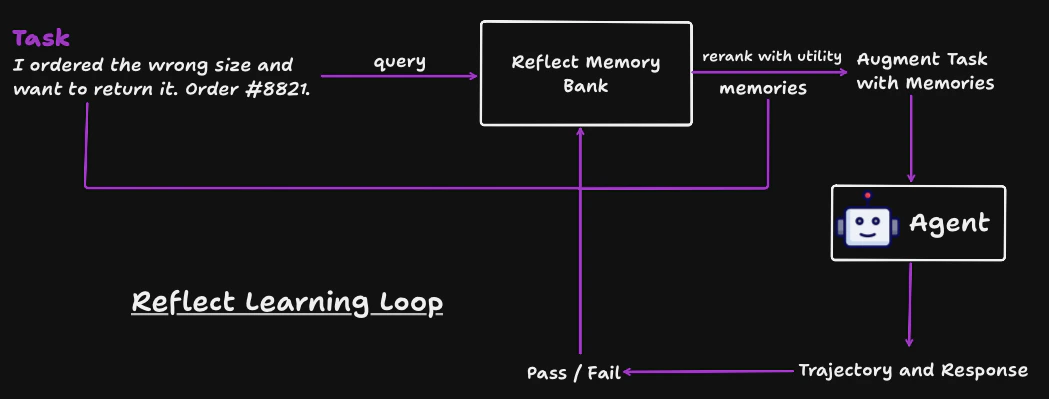
The next time a similar task arrives, Reflect retrieves the most relevant memories and ranks them not just by semantic similarity, but by how useful they have proven in practice. Memories that consistently led to good outcomes rise to the top. Memories associated with failures are deprioritised until they are rehabilitated by a successful run.
Those ranked memories are injected into the agent’s prompt before it runs - so the agent starts each task with the distilled experience of every previous run, not a blank slate.
Works across workflows
Agent agnostic
Use Reflect with any agent that can call the API. It is not tied to a single model, framework, or agent runtime.
Harness agnostic
Plug Reflect into your existing setup, whether you run custom scripts, evaluators, agent loops, or lightweight MCP-based tooling.
Task agnostic
Store and retrieve memories for debugging, implementation, documentation, testing, refactoring, and other kinds of work.
Cross-functional memory reuse
Memories created in one workflow can help with another. A reflection from a coding task can still be useful later in testing, docs, or review work when the task is relevant.
The learning loop
1
Query memories
Before executing a task, retrieve relevant reflections from past runs. Memories are ranked by learned utility.
2
Augment your prompt
Append retrieved memories to the task text. The SDK formats successful and failed reflections into sections your LLM can use as context.
3
Execute the task
Your agent generates a response using the memory-augmented prompt.
4
Record a trace
Store the full trajectory - task, steps, final response, and which memories were used.
5
Submit a review
Mark the outcome as pass or fail. The API generates a new reflection memory and adjusts utility scores of the memories that were retrieved.
Worked example
The following walks through a complete cycle. The agent is a customer support bot that handles refund requests.Step 1 - Query and rerank memories
A customer writes in: “I ordered the wrong size and want to return it. Order #8821.” Before the agent responds, Reflect fetches candidate memories from past support interactions and reranks them by blended score:λ = 0.5, utility and semantic relevance contribute equally. A memory that consistently led to pass outcomes floats to the top even if it is not the closest semantic match.
Reranked order: [1] confirm order [2] ask reason code [3] offer exchange
Step 2 - Augment the task prompt
Reflect injects the top memories into the task before it reaches the agent:Step 3 - Agent runs and produces a trajectory
The agent receives the augmented prompt, calls tools, and replies to the customer. A trajectory is the full record of that execution:User
“I ordered the wrong size and want to return it. Order #8821.”
Tool call - lookup_order
Agent calls
lookup_order("8821") to verify the order before taking any action.Result: { item: "Running Shoes", size: "US 9", status: "delivered" }Tool call - send_message
Agent calls
send_message to contact the customer.Message sent: “Hi Jamie - I can see order #8821 for Running Shoes (US 9). Would you prefer an exchange for a different size, or a full refund? Could you also confirm the reason for the return?”Result: { status: "sent" }Final response
“I’ve verified your order and sent you an email to confirm your preference and return reason.”
Step 4a - Pass: reflection stored as a new memory
The agent verified the order, collected a reason, and offered an exchange first. The support team marks the outcomepass.
Reflect generates a reflection from the trajectory and stores it as a new memory:
Step 4b - Fail: reflection stored as a new memory
Now consider an earlier run, before these memories existed. The agent skipped the lookup and replied immediately:“No problem! I’ve gone ahead and issued a full refund for order #8821. You’ll see it in 3–5 business days.”The order did not exist in the system - it had already been cancelled and refunded. The support team marks this
fail with feedback: "Refund issued on a cancelled order - no order lookup was performed".
Reflect generates a reflection from the failed trajectory and stores it as a new memory:
Future support requests about returns will now retrieve these reflections, and the agent avoids the same mistakes automatically.
Use cases by industry
Software engineering
Agents that write, review, or debug code learn which patterns led to passing tests and which caused regressions. A reflection from a failed code review surfaces automatically the next time a similar change is proposed.
Customer support
Support agents learn from resolved tickets - what tone worked, which escalation paths succeeded, and which assumptions caused incorrect refunds or missed SLAs. Each outcome improves the next interaction.
Manufacturing & operations
Agents diagnosing equipment faults or generating maintenance plans retrieve memories from past incidents. A root-cause finding from a previous machine failure informs the response to a new one with similar symptoms.
Healthcare & clinical
Clinical decision-support agents retrieve prior case reflections when evaluating similar presentations. Memories from cases where a recommendation was later revised carry lower utility scores and are deprioritised automatically.
Legal & compliance
Contract review or compliance agents learn which clause interpretations were accepted by counsel and which were flagged. Accepted patterns are reinforced; rejected ones are down-ranked over time.
Finance & risk
Agents generating investment summaries or risk assessments learn which analyses were signed off and which were sent back for revision. Approved reasoning patterns resurface on similar instruments.
Next steps
Installation
Install the SDK with pip.
Quickstart
Create a client, query memories, and record a trace.
Memories
Query and augment tasks with past reflections.
Reference
Full ReflectClient method reference.